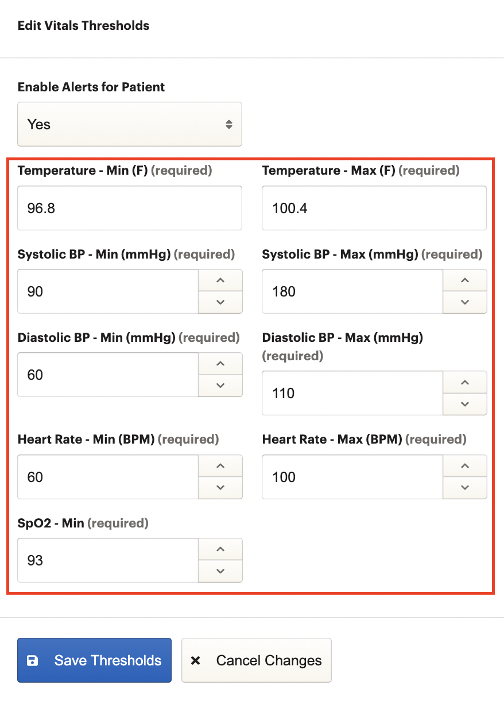
Alert thresholds determine how patients are assigned to risk categories and when alerts should be triggered.
Why It's Important
The three risk categories, low risk, medium/rising risk, and high risk, divide patients based on a two week average of a patient’s measured values for a given program. You can see these categories plainly on the Dashboard when looking at different views. The thresholds that determine “cut-off” values between the risk categories are configurable settings within Alert / Status Thresholds.
Similarly, the value(s) that determine when a patient will trigger an alert within a given program are configured within Alert / Status Thresholds. Patients with active alerts can be easily found by selecting Active Alerts from the Dashboard. Additionally, patients with an active alert will display a small bell icon under their name.
How to Access
Alert / Status Thresholds is accessed via Account Configuration from the dropdown menu in the upper right hand corner of the screen.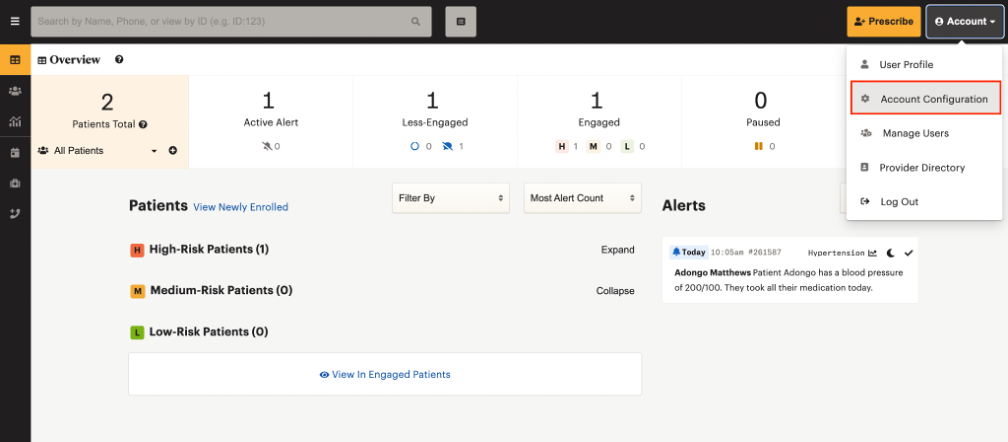
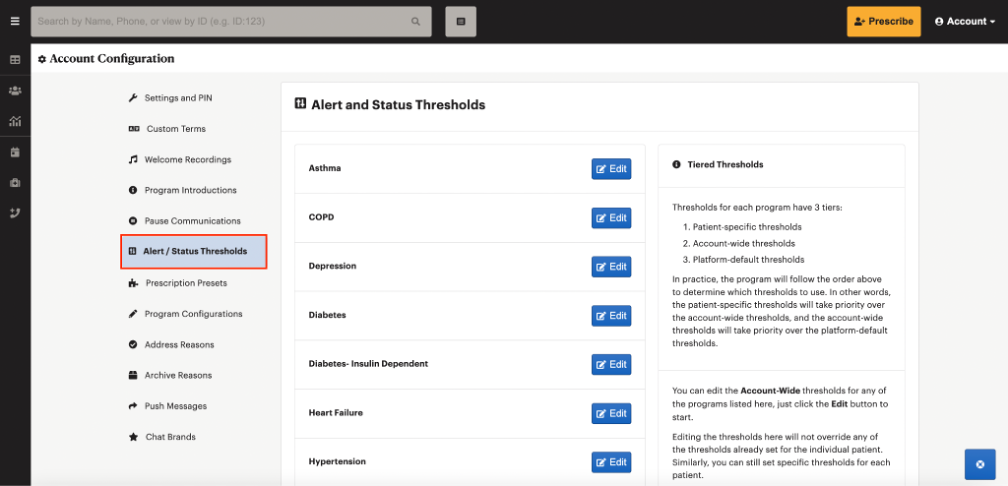
How to Use
There is a hierarchical system for threshold settings to determine the settings that should apply in a given scenario ranging from the most specific patient-specific level, to the account-wide level, and finally the most broad platform-default level. In any given scenario we will always respect the patient-specific thresholds if they exist for a particular patient. However, if no patient-specific thresholds exist on a given patient, we will then default to the account-wide thresholds for the given program. Similarly, in the situation that there are no patient-specific nor account-wide thresholds, we will default to the platform-default thresholds.
To edit the account-wide threshold settings for a program, begin by clicking the Edit button corresponding to that program. You will then be able to enable or disable alerts for patients in that program as well as edit any program-specific thresholds.
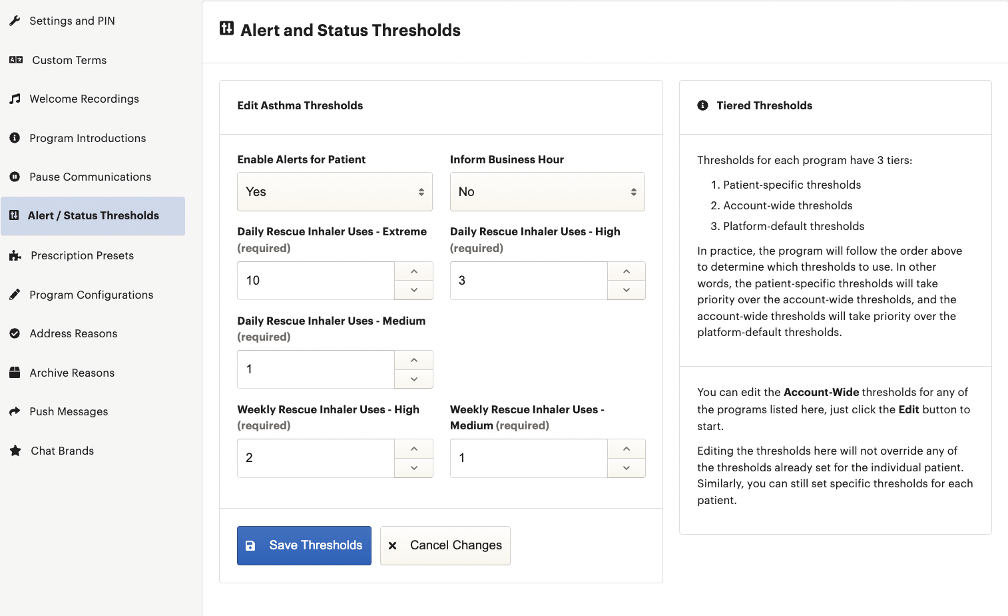
To configure patient-specific thresholds, begin by opening a patient’s Patient Details page. From the Patient Details page, navigate to Manage Prescription and subsequently to the Thresholds tab. You will then be able to enable or disable alerts for that particular patient as well as edit any patient-specific thresholds.
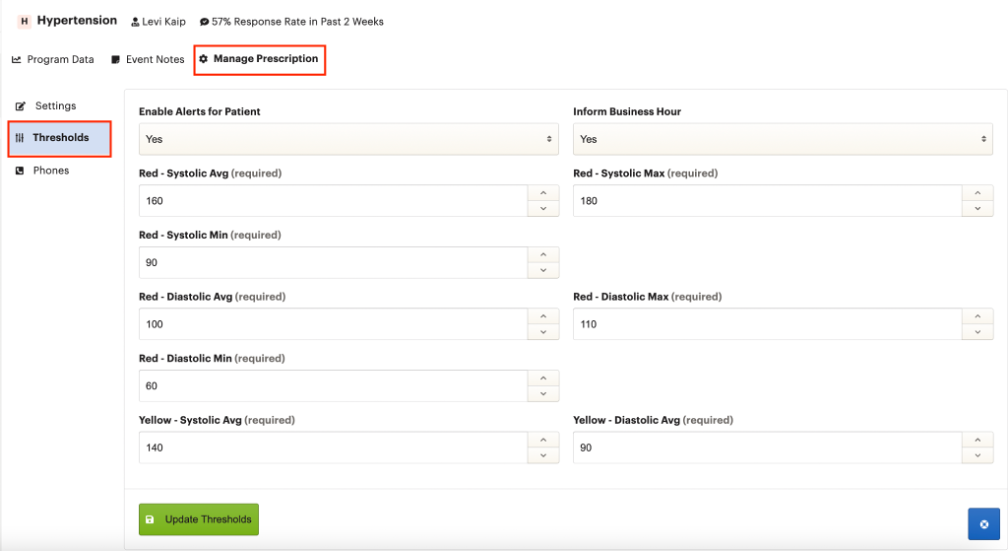
Within the threshold settings for a given program, regardless of level, you will see various configurable settings. The Enable Alerts for Patients and Inform Business Hour settings are consistent across the majority of programs and allow you to enable/disable alerts as well as pause alerts outside of business hours (not recommended) respectively. The remaining settings control the thresholds for either the risk categories or alerts. These settings can vary significantly across programs depending on the metrics used by the program.
Note: If a patient is resolved, it will both resolve active alerts as well as set their status back to low-risk (green).
Risk Categories / Status
There are three risk categories that a patient can fall within:
- High-Risk
- Medium/Rising-Risk
- Low-Risk
Note: The system will strictly look back two weeks for recorded values to assign risk to a patient. This means that a patient could potentially move between risk categories regardless of whether they have recorded a new value because older values could fall outside of that constantly moving two-week window.
There are three different methods that will determine the risk category assigned to a patient depending on the program that they are enrolled in.
1. All programs except Hypertension and Diabetes
The risk category for a patient is determined by the number of active alerts that patient has generated in the past two weeks from the current day.
- High-Risk => Patient has generated more than 2 alerts in the past two weeks
- Medium/Rising-Risk => Patient has generated 1-2 alerts in the past two weeks
- Low-Risk => Patient has generated 0 alerts in the past two weeks
2. Hypertension
The risk category for a patient is determined by configurable values for the diastolic average and the systolic average.
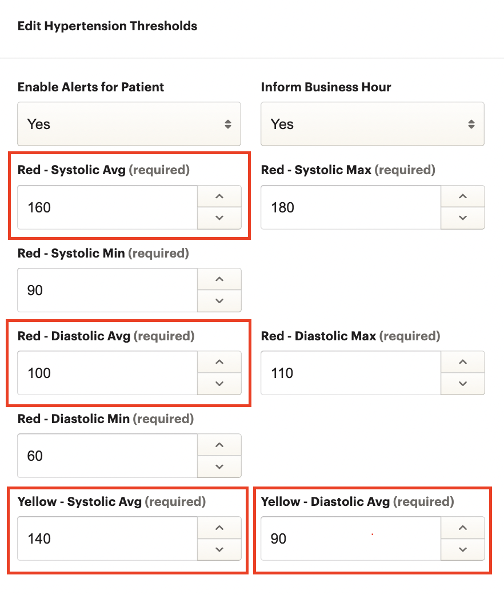
- High-Risk => Patient’s systolic average is greater than or equal to Red - Systolic Avg OR diastolic average is greater than or equal to Red - Diastolic Avg over the past two weeks
- Medium/Rising-Risk => Patient’s systolic average is greater than or equal to Yellow - Systolic Avg OR diastolic average is greater than or equal to Yellow - Diastolic Avg over the past two weeks
- Low-Risk => All other patients
Note: Alerts and risk are not directly related in the Hypertension program like they are for most other programs. Because the alerts and risk use different values, a patient could potentially trigger an alert while being low-risk, not trigger an alert while being high-risk, etc.
3. Diabetes
The risk category for a patient is determined by configurable values for the fasting average.
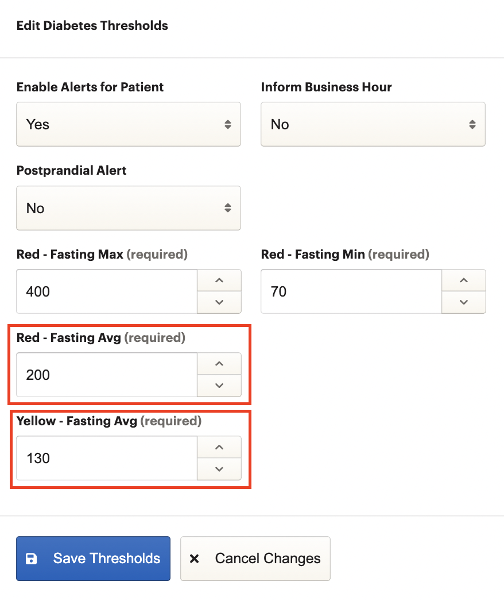
- High-Risk => Patient’s fasting average is greater than or equal to Red - Fasting Avg over the past two weeks
- Medium/Rising-Risk => Patient’s fasting average is greater than or equal to Yellow - Fasting Avg over the past two weeks
- Low-Risk => All other patients
Note: Similar to the Hypertension program, alerts and risks are not directly related in the Diabetes program. Because the alerts and risk use different values, a patient could potentially trigger an alert while being low-risk, not trigger an alert while being high-risk, etc.
Alerts
Alerts can be triggered by patients if they record a value that exceeds a configured threshold. This can inform providers that particular patients may require attention. Alert thresholds vary by program.
Asthma
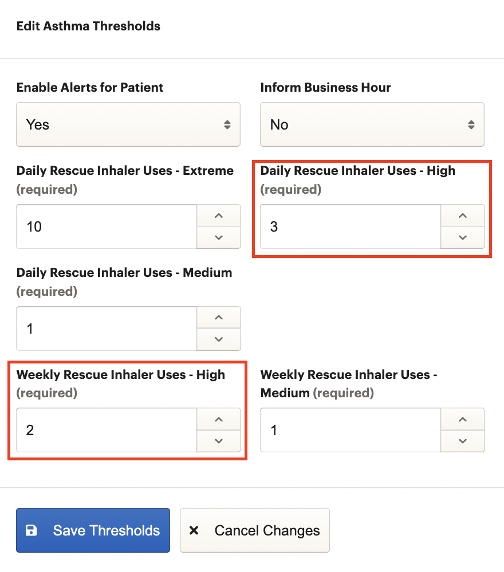
Asthma alerts are triggered when one of the following occurs.
- Patient’s rescue inhaler uses in a day meets or exceeds Daily Rescue Inhaler Uses - High
- Days where patient used rescue inhaler in a week meets or exceeds Weekly Rescue Inhaler Uses - High
COPD
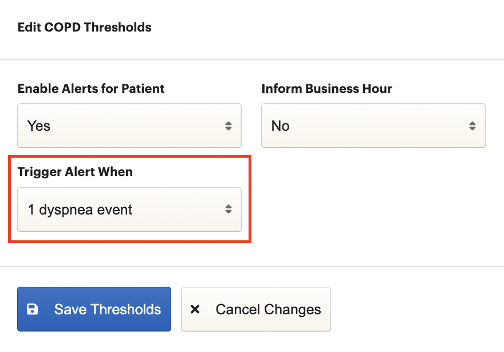
COPD alerts are triggered when the number of dyspnea events recorded meets the value in Trigger Alert When.
Depression
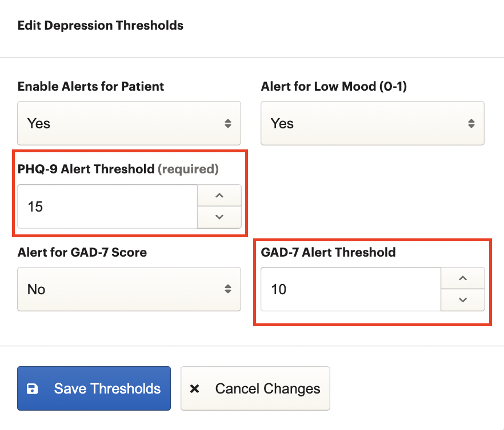
Depression alerts are triggered when one of the following occurs.
- A recorded PHQ-9 score meets or exceeds PHQ-9 Alert Threshold
- A recorded GAD-7 score meets or exceeds GAD-7 Alert Threshold
Diabetes
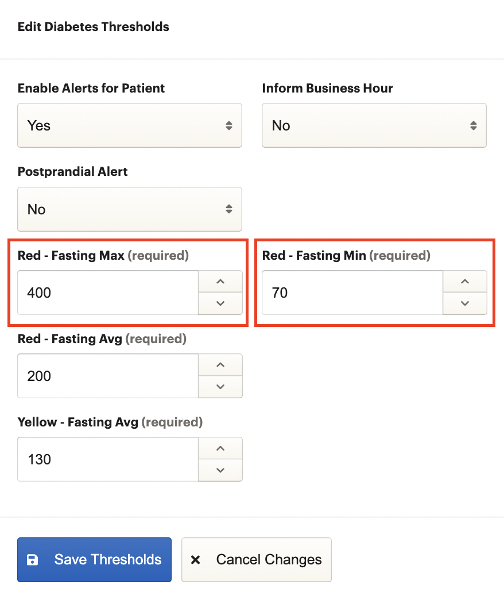
Diabetes alerts are triggered when one of the following occurs.
- A recorded fasting value is equal to or greater than Red - Fasting Max
- A recorded fasting value is equal to or less than Red - Fasting Min
Diabetes- Insulin Dependent
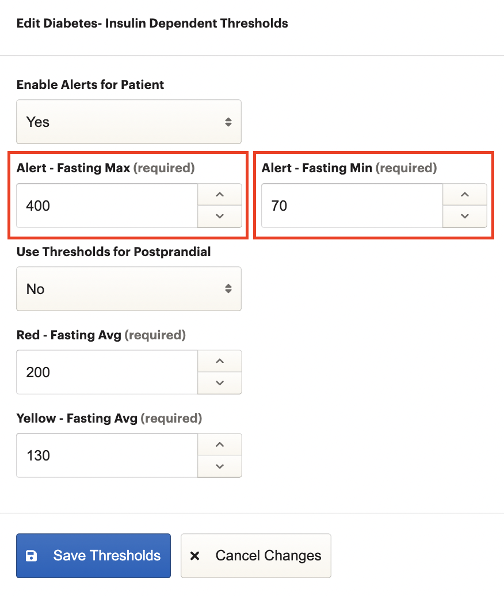
Diabetes- Insulin Dependent alerts are triggered when one of the following occurs.
- A recorded fasting value is equal to or greater than Alert - Fasting Max
- A recorded fasting value is equal to or less than Alert - Fasting Min
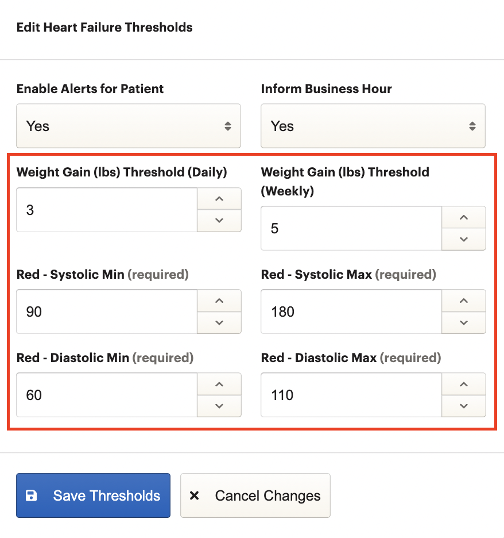
Heart Failure
Heart Failure alerts are triggered when one of the following occurs.
- A patient’s weight has increased in a single day by a value that meets or exceeds Weight Gain (lbs) Threshold (Daily)
- A patient’s weight has increased in a single day by a value that meets or exceeds Weight Gain (lbs) Threshold (Weekly)
- A recorded systolic blood pressure that is equal to or greater than Red - Systolic Max
- A recorded systolic blood pressure that is equal to or less than Red - Systolic Min
- A recorded diastolic blood pressure that is equal to or greater than Red - Diastolic Max
- A recorded diastolic blood pressure that is equal to or less than Red - Diastolic Min
Hypertension
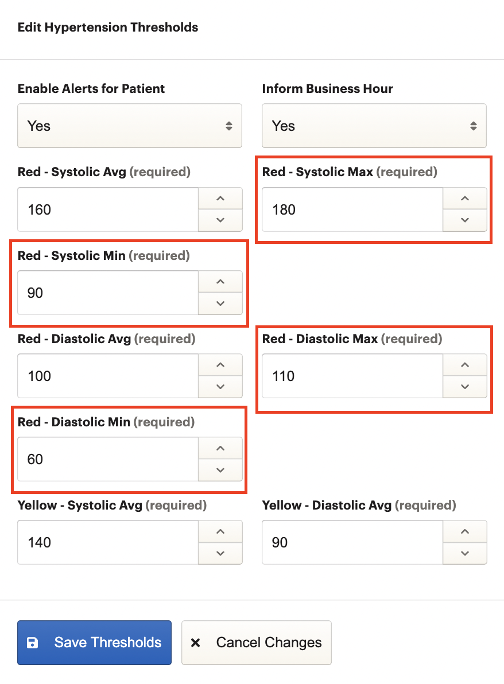
Hypertension alerts are triggered when one of the following occurs.
- A recorded systolic blood pressure that is equal to or greater than Red - Systolic Max
- A recorded systolic blood pressure that is equal to or less than Red - Systolic Min
- A recorded diastolic blood pressure that is equal to or greater than Red - Diastolic Max
- A recorded diastolic blood pressure that is equal to or less than Red - Diastolic Min
Medication Tracking
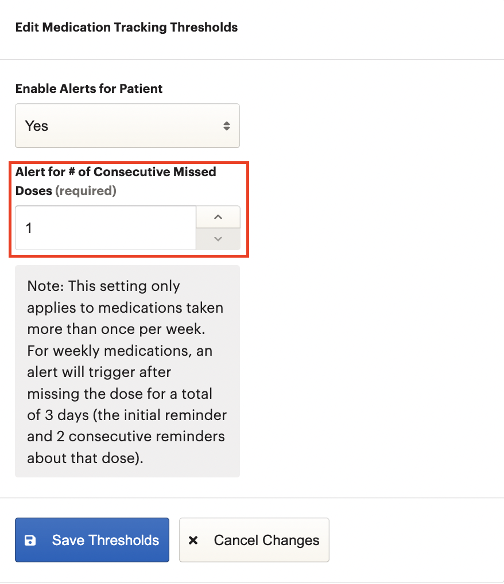
Medication Tracking alerts are triggered when a patient misses consecutive medication doses that meets or exceeds Alert for # of Consecutive Missed Doses.
Substance Use
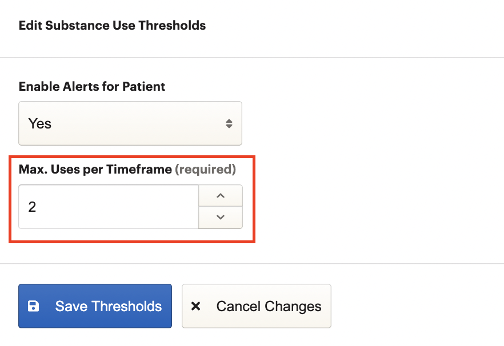
Substance Use alerts are triggered when a patient’s reported uses meets or exceeds Max Uses per Timeframe.
Vitals
Vitals alerts are triggered when one of the following occurs.
- Patient’s body temperature is equal to or less than Temperature - Min (F)
- Patient’s body temperature is equal to or greater than Temperature - Max (F)
- Patient’s systolic blood pressure is equal to or less than Systolic BP - Min (mmHg)
- Patient’s systolic blood pressure is equal to or greater than Systolic BP - Max (mmHg)
- Patient’s diastolic blood pressure is equal to or less than Diastolic BP - Min (mmHg)
- Patient’s diastolic blood pressure is equal to or greater than Diastolic BP - Max (mmHg)
- Patient’s heart rate is equal to or less than Heart Rate - Min (BPM)
- Patient’s heart rate is equal to or greater than Heart Rate - Max (BPM)
- Patient’s SpO2 is equal to or less than SpO2 - Min